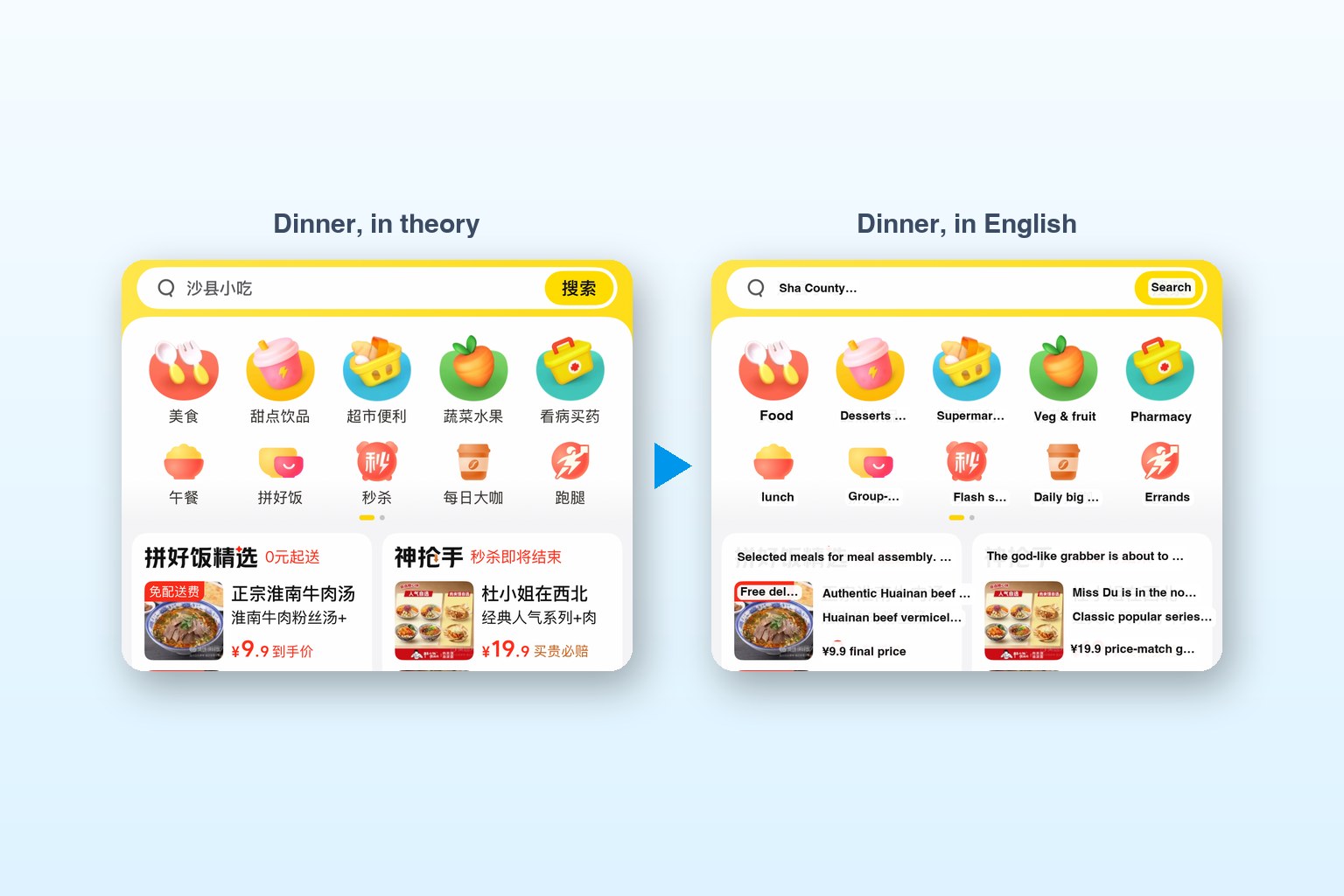
This is the long version of the translation layer in the main story. The goal: the phone on the left, and on the right the same screen with English painted over the Chinese, updating as I scroll. Everything runs on the Mac. Nothing is sent to a translation service.
The pipeline
Screenshot, OCR, translate, paint
- A small Swift tool reads image paths on stdin. For each one it runs Apple's Vision text recognition, keeps only lines with Chinese in them, and prints JSON: the original text, the English, and a bounding box from 0 to 1.
- Apple's Translation framework does Chinese to English on-device, with the model downloaded once in macOS settings.
- A Python server grabs a screenshot from WebDriverAgent about once a second, pipes it to the Swift tool, applies the menu rules, and serves a page on
localhost:8200: live video on the left (WebDriverAgent's MJPEG stream on port 9100), the translated frame on the right.
let req = VNRecognizeTextRequest()
req.recognitionLevel = .accurate
req.recognitionLanguages = ["zh-Hans", "en-US"]
req.usesLanguageCorrection = false

let session = TranslationSession(
  installedSource: Locale.Language(identifier: "zh-Hans"),
  target: Locale.Language(identifier: "en"))
Speed
From 10 seconds to 0.7
10 s
per screen, version 1
0.7 s
per screen, version 2
0
bytes sent to a translation service
Version 1 was correct and useless. It translated every string on the screen before showing anything, so each new screen took about ten seconds. By then I'd scrolled past it.
Version 2 splits the work in two. The main loop runs OCR on each frame and answers immediately with whatever English is already in the cache. A background worker translates new strings four at a time and fills the cache. The first frame of a new screen shows a few blanks, and they fill in a moment later. Menus repeat a lot of words, so the cache warms up fast.
// Background worker: translates a few strings at a time
// so frames are never held up.
let batch = Array(wanted.filter { cache[$0] == nil }.prefix(4))
let rs = try? await session.translations(
  from: batch.map { TranslationSession.Request(sourceText: $0) })
Menus are not sentences
The glossary and the rules
A general translator is great at sentences and terrible at menus. Some of my favourites:
| Chinese | Translator said | Really means |
|---|---|---|
| 拼好饭 | "Cook the meal." | Group-deal meals |
| 买贵必赔 | "If you buy it at a high price, you will be compensated." | Price-match guarantee |
| 起送 ¥25 | "Free delivery from Yuanqi" | Minimum order ¥25 |
| 惠 | "favour" | Deal |
| a noodle shop's name | "Uncle Rice" | A perfectly normal name |
So there are two layers in front of the translator. A glossary of about 60 app words (首页 Home, 选规格 Choose options, 加入购物车 Add to cart, 免配送费 Free delivery), and a dozen regex rules for the patterns that carry numbers:
RULES = [
  (r"起送\s*¥?\s*([\d.]+)",  r"Min. order ¥\1"),
  (r"配送\s*约?\s*¥\s*([\d.]+)", r"Delivery ~¥\1"),
  (r"月售\s*(\d+\+?)",        r"\1 sold/month"),
  (r"(\d+(?:-\d+)?)\s*分钟",   r"\1 min"),
  (r"([\d.]+)\s*分",          r"\1 rating"),
  (r"满\s*([\d.]+)\s*减\s*([\d.]+)", r"¥\2 off over ¥\1"),
]
The rules only win if they cover all the Chinese in a line. Otherwise the line goes to the general translator. "4.5分" becomes "4.5 rating" instead of "4.5 points", and "满30减5" becomes "¥5 off over ¥30", which is what you actually need to know at 2 a.m.
A small safety net
Red labels on money buttons
Any line containing a payment or order word (支付, 提交订单, 去结算, 下单, 付款, 购买, 确认订单) gets a red label instead of a white one. It's for me as much as for the agent: when the screen is a wall of coupons and countdowns, the button that spends money should be impossible to miss.
Honest limits
What it still gets wrong
- Shop names get translated literally. Hence "Uncle Rice".
- Tiny text on promo badges sometimes isn't recognised at all.
- It's a picture, not the app. The overlay is on a screenshot, so it lags the live video by about a second.
- The Swift tool crashed once (a broken pipe), so the server now restarts it automatically.
For a menu at 2 a.m., none of that mattered. It was the difference between guessing and reading.
Back to the story: I Can't Read Chinese, So I Gave My iPhone to an AI and It Ordered Dinner
Anuj Sehgal · CEO, DocQ
He builds AI agents for documents and business processes, and occasionally for dinner. Say hello on LinkedIn.