Templates Overview
Create reusable document templates to generate documents with consistent structure.
Templates allow you to create multiple documents that share the same structure. Common content lives in the template body, while varying content -- such as names, dates, or answers -- is defined through variables that get filled in each time a new document is created from the template.
How Templates Work
A template is a reusable document blueprint. When someone creates a document from a template, the fixed content is copied as-is and the variable placeholders are replaced with the values provided.
There are two ways to feed values into a template:
- Share a form -- Create a shareable link so external or internal users can fill out a web form. The submitted values populate the template and generate a new document. See Forms for details.
- Create from template -- Navigate to the Documents section and select From template to manually fill in the variable values and generate the document.
Creating Templates
DocQ provides three methods for creating templates.
Upload a New Template
- Open the Document Templates menu.
- Click +Add Template.
- Enter a name for the template.
- Select a workflow to associate with documents created from this template.
- Choose a Content Access group to control who can view and use the template.
- Upload a
.docxor.pdffile. - Click Create.
Info
After uploading a .docx template, you can edit its content directly within DocQ using the embedded editor. PDF templates cannot be edited after upload -- only their variable positions can be adjusted.
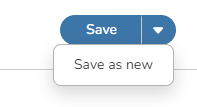
Save as New (Clone)
If you already have a template and want to create a copy, use the Save as new option. This creates an identical duplicate of the template, including all form customization, variables, and settings.
Create from an Existing Document
You can convert any document already in DocQ into a template:
- Go to Documents and locate the document you want to use.
- Open the document for editing.
- Navigate to the Revisions panel.
- Select the option to create a template from the current file version.
This is useful when a finalized document should serve as the basis for future documents with the same structure.
Editing Templates
After a .docx template has been created, you can modify its content using the embedded editor. This lets you update the fixed text, adjust formatting, and add or remove variable placeholders without re-uploading the file.
PDF templates do not support content editing, but you can reposition variables and adjust their sizing on the template preview.
Next Steps
- Variables -- Add dynamic fields to your templates
- eSignatures in Templates -- Configure signature fields, date stamps, and attachments
- Forms -- Share templates as web forms and customize the form layout