Versions & History
Upload new document versions and track the complete audit trail.
DocQ maintains a full version history and audit trail for every document, giving you complete visibility into how a document has changed over time and who has interacted with it.
Uploading New Versions
To replace the current document file with an updated version:
- Open the document detail view.
- Click the Upload file button.
- Select the new file from your computer.
The uploaded file becomes the current version of the document.
Warning
Uploading a new version is only available for documents with Active status. When a new version is uploaded, all existing signatures on the document are discarded.
Pending Signatures in Parallel Steps
If the document is currently in a parallel workflow step with a pre-approval configuration, other recipients may have already signed the document. In this scenario, DocQ displays a pop-up when you attempt to upload a new version, allowing you to choose how to handle the pending signatures.
This ensures you are aware of the impact before proceeding, since uploading a new version will invalidate all collected signatures.
Info
For more details on parallel workflow steps and pre-approval configurations, see Step Types.
Document History
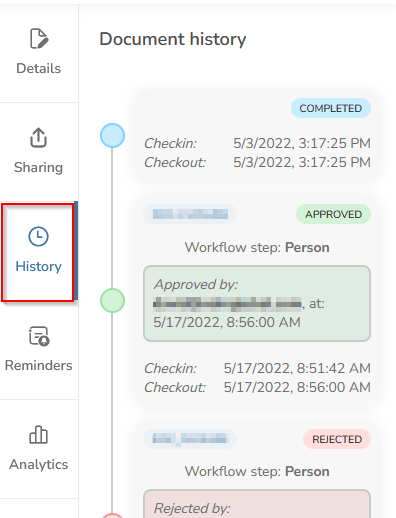
Every document in DocQ has a complete audit trail that records all actions taken throughout its lifecycle.
What Is Tracked
The history log captures every event associated with the document, including but not limited to:
- Workflow transitions -- When the document moves between workflow steps, including the step name and any conditions that triggered the transition.
- Sharing events -- When the document is shared with internal or external users, including the recipient and access level.
- Review actions -- Approvals, rejections, and signature events, including who took the action and when.
- Edits and updates -- Content edits, metadata changes, version uploads, and renames.
- Split and merge operations -- When a document is split into parts or merged with other documents.
- Reminder scheduling -- When reminders are set and triggered.
- Status changes -- Transitions between Active and Completed status.
Info
The audit trail records all actions, even if no changes resulted from the action. For example, if a user opens a document for review but takes no action, the access event is still logged.
Viewing History
To access a document's history:
- Open the document from the Documents list.
- Navigate to the History tab in the document detail view.
- Browse the chronological list of events, each showing the action, the user who performed it, and the timestamp.
Next Steps
- Editing Documents -- Upload new versions and manage document properties
- Reviewing Documents -- Understand the review actions that appear in history
- Workflows Overview -- Learn about the workflow steps tracked in document history