SmartRecruiters
Automate hiring workflows by connecting DocQ with SmartRecruiters ATS.
The SmartRecruiters Plugin connects DocQ with the SmartRecruiters applicant tracking system (ATS) to automate data flows in both directions. You can trigger DocQ operations based on SmartRecruiters events (incoming via webhooks) and push DocQ form data and documents back into SmartRecruiters (outgoing via workflow plugin steps).
This integration enables you to sync with candidate data, update candidate profiles and documents through DocQ forms, and keep both systems in alignment throughout the hiring process.
Webhooks (Incoming Data)
Webhooks allow you to trigger operations in DocQ based on events that occur in SmartRecruiters. When a candidate is created or their status changes, SmartRecruiters sends a notification to DocQ, which then executes the configured operation.
Supported Triggers
Webhooks can be triggered by:
- Applicant creation — a new candidate is added to SmartRecruiters.
- Status update — a candidate moves to a new status. Supported statuses include:
- NEW
- IN-REVIEW
- OFFERED
- HIRED
You can further narrow triggers to specific sub-statuses within each main status.
Setting Up a Webhook
- Navigate to Settings > Plugins > SmartRecruiters Plugin settings.
- Click Add WebHook.
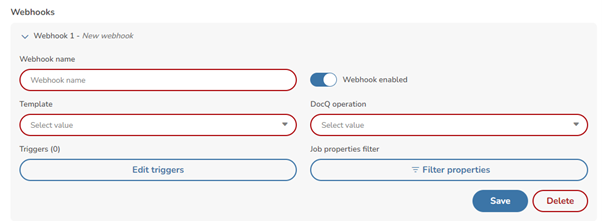
- Configure the webhook:
- Active — toggle the webhook on or off.
- Webhook name — provide a descriptive name for identification.
- DocQ operation — select the operation to execute when the webhook fires (see below).
- Click Edit triggers to define which SmartRecruiters events should activate this webhook. Select the applicable trigger type (applicant creation or status update) and, for status updates, choose the specific statuses and sub-statuses.
Available Operations
Send Form to Candidate's Email
When triggered, DocQ sends a form to the candidate's email address as recorded in SmartRecruiters. The candidate completes the form, and the submitted data is captured in DocQ.
Send Form to Static Email
Similar to the candidate email operation, but the form is sent to a fixed email address instead. Configure the recipient by specifying:
- Name — the recipient's display name.
- Email — the fixed email address.
This is useful when forms need to go to an HR coordinator or hiring manager rather than the candidate.
Job Fields into DocQ Template
Maps SmartRecruiters candidate and job fields into a DocQ document template. This operation automatically populates template variables with data from SmartRecruiters, creating a pre-filled document.
To configure:
- Select the DocQ template to populate.
- Set up field mappings between SmartRecruiters fields and DocQ template variables.
Warning
Watch for inactive fields in SmartRecruiters when setting up field mappings. If a SmartRecruiters field is deactivated after the mapping is created, the mapping will fail silently. Periodically review your mappings to ensure all source fields remain active.
Workflow Plugin (Outgoing Data)
The workflow plugin step allows you to export DocQ form data and documents to SmartRecruiters and optionally update the candidate's hiring status — all as part of a DocQ workflow.
Setting Up a Workflow Plugin Step
- Open the workflow in the workflow editor.
- Add a new Plugin step to the canvas.
- Select Smart Recruiters as the plugin type.
- Review the existing mappings or create a new one by clicking New mapping.
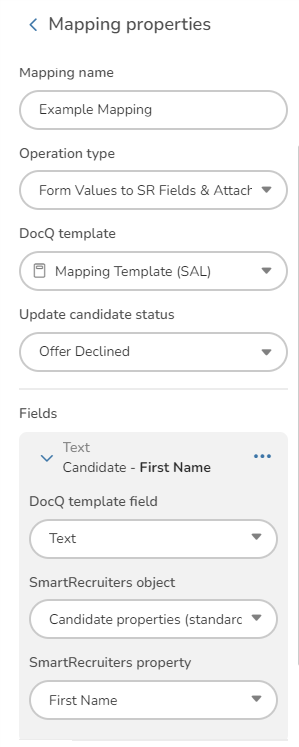
Mapping Configuration
Each mapping defines how DocQ data is sent to SmartRecruiters. Configure the following:
- Mapping name — a descriptive name for the mapping.
- DocQ template — the document template whose variables provide the source data.
- Operation type — the type of data transfer (see below).
- Hiring Process — optionally update the candidate's status in SmartRecruiters when this step executes (e.g., move from OFFERED to HIRED).
Operation Types
Form Values to SR Fields
Maps DocQ form variable values to SmartRecruiters candidate or job fields.
- Object — select whether to update Candidate fields or Job fields.
- Property mapping — for each mapping row, select the SmartRecruiters property to update and the DocQ template variable that provides the value.
Form Values to CSV Fields
Exports DocQ form data as a CSV file and sends it to a configured FTP location.
- FTP setup — configure the FTP destination for the CSV file.
- CSV header — define the column headers for the CSV.
- CSV Value Type — choose between a dynamic value from a template variable or a constant value. When using a constant, specify the default value to write in the column.
Form Values to SR Attachment
Attaches the DocQ document to the candidate's profile in SmartRecruiters. This operation takes the document from the current workflow and uploads it as an attachment on the candidate record.
Form Values to SR Fields & Attachment
Combines both operations — maps form variable values to SmartRecruiters fields and attaches the document to the candidate's profile in a single step.
Info
When configuring the Hiring Process status update, the candidate's status in SmartRecruiters will be updated automatically when the plugin step executes. Ensure the target status is valid for the candidate's current position in the hiring pipeline to avoid errors.
Next Steps
- Integrations Overview — explore other integration options available in DocQ.
- Step Types — learn more about Plugin steps and other workflow step types.
- Creating Workflows — build workflows that incorporate SmartRecruiters integration steps.